
Getting Started
Understanding the schema documentation
The title block of each schema page looks like
Schema Form16.xsd
| schema location: | Form16.xsd |
| targetNamespace: | http://www.osb.gc.ca/eFiling |
The schema location is a hyperlink pointing to the actual schema file. Note that all of the XML schema for
the E-Filing project belong to the above namespace.
Simple Element
An element is a part of the form. A simple element usually relates to one "blank" (field) on a form. Each element has an assigned data type that is either a standard XML schema type or one of the data types defined in Globals.xsd.
In this example, GivenNames for NameOfTrustee is a new element being defined in the http://www.osb.gc.ca/eFiling namespace which is of the type "string" in the "xs:" namespace (where "xs:" is an abbreviation).
element Form16/NameOfTrustee/GivenNames
diagram namespace http://www.osb.gc.ca/eFiling type xs:string annotation
documentation Trustee Given Names

Complex Element (Sequence)
A complex element contains other elements (simple or complex) and relates to one or more "blanks" (fields) on a form.
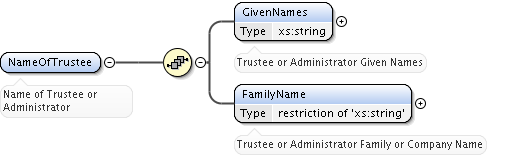
The following element is a complex element that contains a sequence of two simple elements (children) that are both strings.
Items in a sequence must occur in the order shown. You can tell this is a sequence by the [•••] symbol in the diagram. In this example all children are mandatory.
element Form16/NameOfTrustee
diagram namespace http://www.osb.gc.ca/eFiling children GivenNames FamilyName annotation
documentation Name of Trustee
Complex Element (Choice)
Another type of complex element contains choices. In this example, a legal entity can be either a natural person or a corporation.
element Form88/Bankrupt
diagram namespace http://www.osb.gc.ca/eFiling type osb:LegalEntity children Company Individual annotation
documentation Name of Bankrupt

Enumerated Values
Certain element can contain a finite list of valid values. Enumerations are listed in the element details where they have been defined.
element Form1/District
diagram namespace http://www.osb.gc.ca/eFiling type osb:Province facets enumeration BC enumeration AB enumeration SK enumeration MB enumeration ON enumeration QC enumeration NB enumeration NS enumeration PE enumeration NL enumeration YT enumeration NT enumeration NU annotation
documentation District Code

Bankruptcy Forms as a Complex Element
Each bankruptcy form is defined as a complex element containing complex and simple elements.
More About Elements
An element can be optional or mandatory. Optional elements may be skipped for certain filings, but development MUST have the ability to include these elements if required whereas mandatory elements must be included every time. Optional elements are displayed in the diagrams as a light grey box, as shown below. Mandatory elements have a black box as shown in the examples under Enumerated Values, Complex Element (Choice), Complex Element (Sequence), and Simple Element.

If an element can occur more than once, the range of allowable occurrences appears below the elements. In the example below, the asset element can appear zero or many times.

Form and Schema
Each prescribed form has a corresponding schema file defined. A schema is a formal design of a package of information.
Navigating the documentation
Many of the diagram elements are hyperlinks to more detailed information. The detailed element and type information is comprehensively hyperlinked and cross-referenced to ease navigation.
References
You can find a description of XML schema in "Using W3C XML Schema" by Eric van der Vlist which is also available online on the O'Reilly xml.com site.
An excellent high-level description of XML and its strategic impact and importance is "XML: A Manager's Guide" by Kevin Dick.